reconstruct
R2026bDescription
Add-On Required: This feature requires the Computer Vision Toolbox Model for MapAnything Network add-on.
reconstructs a 3-D scene from multi-view images using the output = reconstruct(maObj)mapanything
object maObj, and estimates the camera poses, intrinsic parameters,
depth maps, and point clouds for the input images. For large image sequences, the function
processes and automatically aligns overlapping blocks. The function supports GPU
acceleration for faster processing.
specifies additional options using one or more name-value arguments. For example,
output = reconstruct(maObj,Name=Value)BlockSize=50 specifies to process 50 images per block during
reconstruction.
Examples
Download and extract the tum_rgbd_data.zip file. This file includes an images subfolder that contains a sequence of indoor images from the TUM RGB-D data set [1].
if ~exist("tum_rgbd_data.zip","file") websave("tum_rgbd_data.zip","https://ssd.mathworks.com/supportfiles/3DReconstruction/tum_rgbd_data.zip"); unzip(fullfile("tum_rgbd_data.zip"), pwd); end
Create an image datastore by specifying the path to the folder containing the image files, and subsample every 5th frame to reduce processing time when you perform 3-D reconstruction.
imds = imageDatastore("sfmTrainingDataTUMRGBD\images");
numFiles = numel(imds.Files);
imds = subset(imds,1:5:numFiles);Load the camera intrinsics and camera poses. Subsample the poses using the same indices as the images so that the number of poses matches the number of images in the datastore.
camInfo = load(fullfile("sfmTrainingDataTUMRGBD","cameraInfo.mat")); camIntrinsics = camInfo.intrinsics; camPoses = camInfo.cameraPoses; camPoses = transpose(camPoses(1:5:numFiles));
Create a mapanything object using the image datastore, camera intrinsics, and camera poses, and reconstruct the 3-D scene from the images.
maObj = mapanything(imds,Intrinsics=camIntrinsics,CameraPoses=camPoses); maOutputs = reconstruct(maObj);
Processing Individual blocks --------------------------------------------- Processing Block 1/1 Processing point clouds --------------------------------------------- Processing point cloud 21/21
Extract the generated point cloud. Then, visualize the point cloud by using the pcviewer (Point Cloud Toolbox) function, and set the vertical axis and vertical axis direction to match the coordinate system of the TUM RGB-D data set. Modify the view of the point cloud visualization to focus on a region of interest by specifying the low-level camera properties of the axes object.
pcArray = readall(maOutputs.PointClouds); pcMerged = pccat(pcArray); ax = pcviewer(pcMerged);
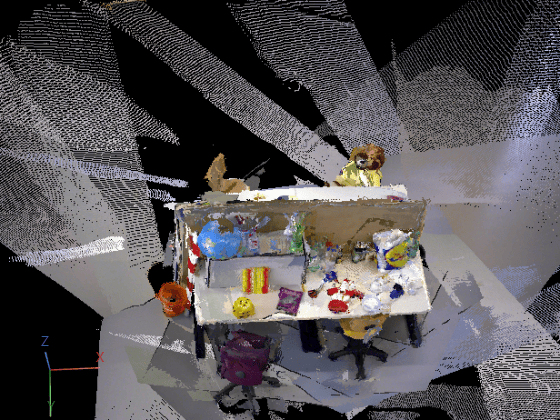
ax.CameraPosition = [-1.5185 -6.5178 -11.9106]; ax.CameraUpVector = [0.0520 -0.8878 0.4572]; ax.CameraViewAngle = 15;
If you are using a GPU resource to run the model, you can release the GPU memory allocated to the model after processing to enable additional models to run on the GPU.
releaseGPUMemory(maObj);
References
[1] Sturm, Jürgen, Nikolas Engelhard, Felix Endres, Wolfram Burgard, and Daniel Cremers. “A Benchmark for the Evaluation of RGB-D SLAM Systems.” 2012 IEEE/RSJ International Conference on Intelligent Robots and Systems, October 2012, 573–80. https://doi.org/10.1109/IROS.2012.6385773.
Input Arguments
MapAnything model, specified as a mapanything
object.
Name-Value Arguments
Specify optional pairs of arguments as
Name1=Value1,...,NameN=ValueN, where Name is
the argument name and Value is the corresponding value.
Name-value arguments must appear after other arguments, but the order of the
pairs does not matter.
Example: reconstruct(maObj,BlockSize=50) specifies to process 50
images per block during reconstruction.
Number of images per block, specified as a positive integer. When the number of
input images to the mapanything object maObj is
greater than the value of the BlockSize argument, the function
divides images into overlapping blocks during reconstruction. When the number of
images is less than the value of BlockSize argument, the function
processes all of the images in a single block. The value of this argument must be
greater than the value of the OverlapLength argument. Decrease this
value to reduce GPU memory and compute requirements at the cost of longer computation
time. For best results, specify this value in the range 20 to
200 for better results depending on the availability of GPU
memory.
Number of overlapping images between blocks, specified as a positive integer. This
value must be less than the value of the BlockSize argument.
Increase this value to improve continuity across blocks at the cost of additional
computation time. For best results, specify this value in the range
10 to 100 depending on the availability of GPU
memory.
Confidence threshold percentile, specified as a positive integer in the range
10 to 100. The function uses this value to
filter low-confidence depth predictions. Decrease this value to retain more points at
the cost of less reliable predictions.
Remove edge artifacts, specified as a logical 0
(false) or 1 (true).
Specify this argument as true to remove unreliable predictions at
image edges, where depth estimation is less accurate, and suppress boundary artifacts
in the reconstructed results.
Data Types: logical
Remove ambiguous region, specified as a logical 0
(false) or 1 (true).
Specify this argument as true to remove geometrically ambiguous
regions, such as sky, reflections, or low‑texture areas, to improve the reliability of
3‑D reconstructions.
Data Types: logical
Resize the output to match the size of the input image, specified as a logical
0 (false) or 1
(true). By default, the model automatically resizes the
resolution of the output based on the aspect ratio of the input images. Specify this
argument as true to resize the output depth maps and point clouds
to the spatial resolution of the input images.
Data Types: logical
Hardware resource on which to run the model, specified as
"auto", "gpu", or "cpu".
The table shows the valid hardware resource values.
| Resource | Action |
|---|---|
"auto"
| Use a GPU if it is available. Otherwise, use the CPU. |
"gpu"
| Use the GPU. To use a GPU, you must have Parallel Computing Toolbox™ and a CUDA® enabled NVIDIA® GPU. If a suitable GPU is not available, the function returns an error. For information about the supported compute capabilities, see GPU Computing Requirements (Parallel Computing Toolbox). |
"cpu"
| Use the CPU. |
Path to the folder in which to store the results, specified as a string scalar or
a character vector. You must specify a path to an existing folder with write
permission. The function creates two subfolders, DepthMaps and
PointClouds, within the specified folder to store the estimated
depth images and point clouds, respectively. If you do not specify this argument, the
function returns the outputs in memory instead of writing them to disk. Saving the
results to disk is recommended for reconstructions with more than 100 input images, to
reduce memory usage.
Display progress information on the command line, specified as a logical
0 (false) or 1
(true). To monitor the progress of the function, specify this
argument as true.
Output Arguments
Reconstruction results estimated by the MapAnything model, returned as a structure with these fields.
| Field Name | Description |
|---|---|
Intrinsics | Estimated camera intrinsic parameters, returned as a
B-by-1 vector of cameraIntrinsics objects.
B is the number of images in the image datastore
specified to the mapanything object
maObj. Each element contains the estimated camera
intrinsic parameters for the corresponding input image. |
Poses | Estimated camera poses, relative to the first image in the input
datastore, in meters, returned as a B-by-1 vector of
rigidtform3d objects. B is the number of images
in the image datastore specified to the mapanything object
maObj. Each element contains the estimated camera pose
for the corresponding input image. The pose corresponding to the first image
is always the identity transform. |
DepthMaps | Estimated depth maps of the input images, returned as a datastore. |
PointClouds | Estimated point clouds of the input images in the world reference frame,
returned as a datastore of pointCloud (Point Cloud Toolbox) objects. |
Data Types: struct
Version History
Introduced in R2026b
See Also
Objects
mapanything|imageDatastore|cameraIntrinsics|rigidtform3-D|pointCloud(Point Cloud Toolbox)
Functions
releaseGPUMemory|pcviewer(Point Cloud Toolbox)
MATLAB Command
You clicked a link that corresponds to this MATLAB command:
Run the command by entering it in the MATLAB Command Window. Web browsers do not support MATLAB commands.
Select a Web Site
Choose a web site to get translated content where available and see local events and offers. Based on your location, we recommend that you select: .
You can also select a web site from the following list
How to Get Best Site Performance
Select the China site (in Chinese or English) for best site performance. Other MathWorks country sites are not optimized for visits from your location.
Americas
- América Latina (Español)
- Canada (English)
- United States (English)
Europe
- Belgium (English)
- Denmark (English)
- Deutschland (Deutsch)
- España (Español)
- Finland (English)
- France (Français)
- Ireland (English)
- Italia (Italiano)
- Luxembourg (English)
- Netherlands (English)
- Norway (English)
- Österreich (Deutsch)
- Portugal (English)
- Sweden (English)
- Switzerland
- United Kingdom (English)