Main Content

sicklidar2d

Lidar scan streaming from SICK 2-D lidar sensor

Since R2026a

    Description

    Add-On Required: This feature requires the Lidar Toolbox Support Package for SICK Lidar Sensors add-on.

    The sicklidar2d object can stream lidar scans from a SICK® 2-D lidar sensor. Using this object, you can read and preview the incoming lidar scan data.

    Creation

    Description

    slObj = sicklidar2d creates a sicklidar2d object, slObj, that can stream 2-D lidar scans from a SICK 2-D lidar sensor over a TCP/IP interface using the SICK Command Language ASCII (CoLa A) protocol.

    Note

    Before you create a sicklidar2d object in MATLAB®, you must close any other software that is using the SICK 2-D lidar sensor.

    example

    slObj = sicklidar2d(Name=Value) sets writable properties using one or more name-value arguments. For example, Timeout=20 sets the timeout value to 20 seconds.

    Name-Value Arguments

    expand all

    Specify optional pairs of arguments as Name1=Value1,...,NameN=ValueN, where Name is the argument name and Value is the corresponding value. Name-value arguments must appear after other arguments, but the order of the pairs does not matter.

    IP address of the sensor, specified as a string scalar or character vector.

    This argument sets the IPAddress property.

    Data Types: char | string

    TCP/IP port number for reading the sensor data using the SICK CoLa A protocol, specified as a positive integer.

    This argument sets the Port property.

    Data Types: double

    Maximum time to wait for a response from the sensor, specified as a positive integer in seconds.

    This argument sets the Timeout property.

    Data Types: double

    Properties

    expand all

    This property is read-only after object creation. To set this property, use the IPAddress name-value argument when calling the sicklidar2d function.

    IP address of the sensor, represented as a string scalar or character vector.

    Data Types: char | string

    This property is read-only after object creation. To set this property, use the Port name-value argument when calling the sicklidar2d function.

    TCP/IP port number for reading the sensor data using the SICK CoLa A protocol, represented as a positive integer.

    Data Types: double

    This property is read-only after object creation. To set this property, use the Timeout name-value argument when calling the sicklidar2d function.

    Maximum time to wait for a response from the sensor, represented as a positive integer in seconds.

    Data Types: double

    This property is read-only.

    Firmware version of the sensor, represented as a string scalar.

    Data Types: string

    This property is read-only.

    Device type of the sensor, represented as a string scalar.

    Data Types: string

    This property is read-only.

    Device name of the sensor, represented as a string scalar.

    Data Types: string

    This property is read-only.

    Angular resolution of the sensor, represented as a positive scalar in degrees.

    Data Types: double

    This property is read-only.

    Azimuth limits of the sensor, represented as a two-element vector of the form [min max]. Units are in degrees.

    Data Types: double

    This property is read-only.

    Scanning frequency of the sensor, represented as a positive scalar in Hz.

    Data Types: double

    This property is read-only.

    Valid connection flag, represented as a logical 1 (true) or 0 (false). The flag indicates whether a valid connection is established with the SICK 2-D lidar sensor.

    Data Types: logical

    Object Functions

    previewPreview live lidar scan data from SICK 2-D lidar sensor
    readRead lidar scans from SICK 2-D lidar sensor

    Examples

    collapse all

    Create a sicklidar2d object. Ensure that you specify the correct IP address for your sensor.

    slObj = sicklidar2d(IPAddress="172.18.252.146");

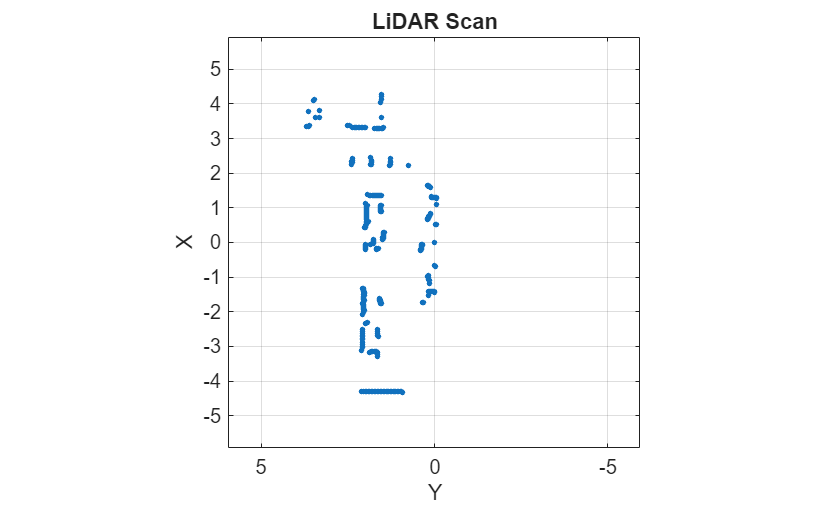
    Read the latest 2-D lidar scan by using the read function of the sicklidar2d object.

    scan = read(slObj);

    Plot all the points of the lidar scan.

    plot(scan)
    Version History

    Introduced in R2026a