Main Content

sicklidar

Point cloud streaming from SICK 3-D lidar sensor

Since R2026a

    Description

    Add-On Required: This feature requires the Lidar Toolbox Support Package for SICK Lidar Sensors add-on.

    The sicklidar object can stream point cloud data from a SICK® 3-D lidar sensor. Using this object, you can read and preview the incoming point clouds.

    Creation

    Description

    slObj = sicklidar creates a sicklidar object, slObj, that can stream point cloud data from a SICK 3-D lidar sensor over TCP/IP interface using the SICK Command Language ASCII (CoLa A) protocol.

    Note

    Before you create a sicklidar object in MATLAB®, you must close any other software that is using the SICK 3-D lidar sensor.

    slObj = sicklidar(Name=Value) sets writable properties using one or more name-value arguments. For example, Timeout=20 sets the timeout value to 20 seconds.

    example

    Name-Value Arguments

    expand all

    Specify optional pairs of arguments as Name1=Value1,...,NameN=ValueN, where Name is the argument name and Value is the corresponding value. Name-value arguments must appear after other arguments, but the order of the pairs does not matter.

    IP address of the sensor, specified as a string scalar or character vector.

    This argument sets the IPAddress property.

    Data Types: char | string

    TCP/IP port number for CoLa A communication, specified as a positive integer.

    This argument sets the Port property.

    Data Types: double

    Maximum time to wait for a response from the sensor, specified as a positive integer in seconds.

    This argument sets the Timeout property.

    Data Types: double

    Properties

    expand all

    This property is read-only after object creation. To set this property, use the IPAddress name-value argument when calling the sicklidar function.

    IP address of the sensor, represented as a string scalar or character vector.

    Data Types: char | string

    This property is read-only after object creation. To set this property, use the Port name-value argument when calling the sicklidar function.

    TCP/IP port number for CoLa A communication, represented as a positive integer.

    Data Types: double

    Maximum time to wait for a response from the sensor, specified as a positive integer in seconds.

    Data Types: double

    This property is read-only.

    Number of point clouds available for streaming in the buffer, represented as a positive scalar. This value is set by the object buffer.

    Data Types: double

    This property is read-only.

    Sensor streaming status, represented as a logical 0 (false) or 1 (true). The value is 1 if the object receives streaming data from the sensor. Otherwise, the value is 0. You can use the start and stop object functions to control data streaming.

    Data Types: logical

    This property is read-only.

    Firmware version of the sensor, represented as a string scalar.

    Data Types: string

    This property is read-only.

    Device type, represented as a string scalar.

    Data Types: string

    This property is read-only.

    Device name, represented as a string scalar.

    Data Types: string

    This property is read-only.

    Serial number of the connected sensor, represented as a string scalar.

    Data Types: string

    This property is read-only.

    UDP port number for reading sensor data packets, represented as a positive integer.

    Data Types: double

    This property is read-only.

    Scan data format, represented as "COMPACT" or "MSGPACK".

    Data Types: string

    This property is read-only.

    Echo configuration of the sensor, represented as "FIRST", "LAST", or "ALL".

    Data Types: string

    Object Functions

    startStart streaming point clouds from SICK 3-D lidar sensor
    readRead point clouds from SICK 3-D lidar sensor
    previewPreview live point cloud data from SICK 3-D lidar sensor
    closePreviewClose preview of live point cloud data from SICK 3-D lidar sensor
    flushDelete point clouds from SICK 3-D lidar object buffer
    stopStop streaming point clouds from SICK 3-D lidar sensor

    Examples

    collapse all

    Create a sicklidar object. Ensure that you specify the correct IP address for your sensor.

    slObj = sicklidar(IPAddress="192.168.0.112");

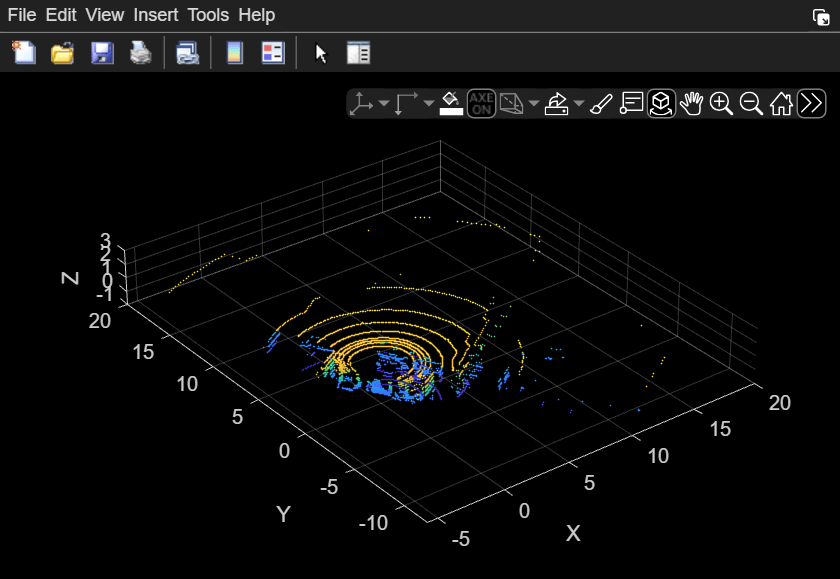
    Preview the point cloud data using the preview object function of the sicklidar object. The preview window opens with the axes limits specified by the three vectors you pass to the preview function. Note that you must close the preview window before you can use the read object function.

    preview(slObj,[-5 20],[-10 20],[-1 3])
    After you preview the data, close the preview window by using the closePreview object function.

    closePreview(slObj)

    Version History

    Introduced in R2026a