Main Content

read

Read point clouds from SICK 3-D lidar sensor

Since R2026a

    Description

    Add-On Required: This feature requires the Lidar Toolbox Support Package for SICK Lidar Sensors add-on.

    ptCloud = read(slObj) returns the oldest point cloud from the buffer of the sicklidar object slObj.

    If the object is streaming, then the function returns the oldest point cloud data available in the buffer at the time of the function call, then continues streaming.

    If the object is not streaming and the buffer contains point clouds, the function returns the oldest point cloud from the buffer. If the buffer does not contain point clouds, the function starts streaming to obtain point cloud data, returns the data, and then stops streaming.

    example

    ptCloud = read(slObj,"all") returns all the point clouds from the buffer of the sicklidar object slObj.

    If the object is streaming, then this syntax returns all existing point clouds in the buffer at the time of the function call. After acquiring them, the object deletes them from the buffer, then continues streaming.

    If the object is not streaming and the buffer contains point clouds, then this syntax returns all available point clouds and the object deletes them from the buffer. If the object is not streaming and the buffer does not contain point clouds, then this syntax returns an empty array.

    ptCloud = read(slObj,numPC) returns the number of point clouds specified by numPC.

    ptCloud = read(slObj,mode) specifies the mode with which to read point clouds from the buffer.

    ptCloud = read(slObj,numPC,mode) specifies the number of point clouds and the mode with which to read them from the buffer. Note that, if you specify mode as "all", you cannot specify the numPC argument.

    example

    [ptCloud,timeStamp] = read(___) returns point clouds and their respective timestamps from the buffer of the sicklidar object slObj using any combination of input arguments from previous syntaxes.

    [ptCloud,timeStamp,pcAttributes] = read(___) additionally returns a structure, pcAttributes, containing attributes for each point in the point clouds.

    Examples

    collapse all

    Create a sicklidar object. Ensure that you specify the correct IP address for your sensor.

    slObj = sicklidar(IPAddress="192.168.0.112");

    Read point cloud data from the object buffer using the read object function. Because slObj is not currently streaming and the buffer contains no point clouds, the read function starts streaming, reads a point cloud, and then stops streaming.

    ptCloud = read(slObj);

    Display the point cloud using the pcshow function.

    pcshow(ptCloud)
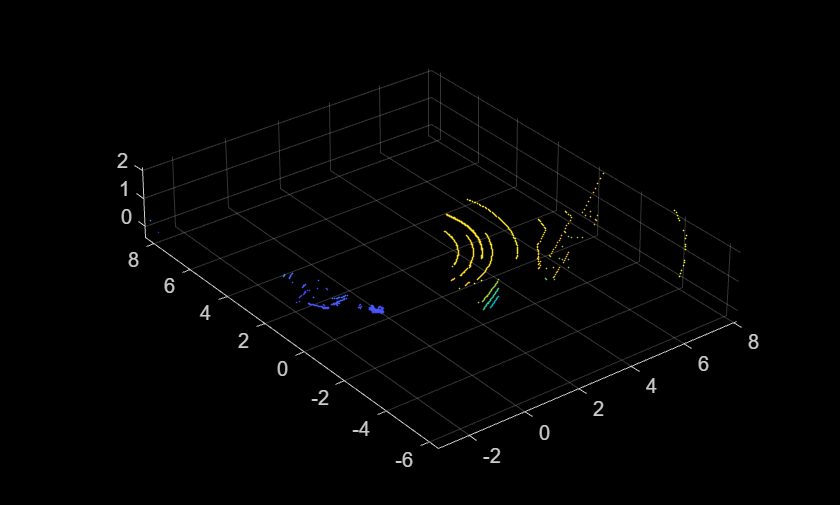
    You can read point clouds from a SICK 3-D lidar sensor by streaming data into the sicklidar object buffer using the start object function, and then reading point clouds from the object buffer.

    Create a sicklidar object. Ensure that you specify the correct IP address for your sensor.

    slObj = sicklidar(IPAddress="192.168.0.112");

    Start streaming point cloud data from the connected sensor into the object buffer.

    start(slObj);

    Wait for 10 seconds, then stop streaming data from the sensor.

    pause(10)
    stop(slObj);

    Display the number of point clouds available in the buffer.

    fprintf("Number of available point clouds in the object buffer = %d\n",slObj.NumPointClouds)
    Number of available point clouds in the object buffer = 69
    

    Read the oldest 10 point clouds from the buffer, then display the number of point clouds remaining in the buffer. Note that the "oldest" mode does not discard the unread point clouds from the buffer.

    ptCloudOldest = read(slObj,10,"oldest");
    fprintf("Number of available point clouds after reading the oldest point clouds = %d\n",slObj.NumPointClouds)
    Number of available point clouds after reading the oldest point clouds = 59
    

    Now, read the five most recent point clouds from the buffer, and verify that the "latest" mode discards the remaining point clouds from the buffer after reading.

    ptCloudLatest = read(slObj,5,"latest");
    Warning: Reading the latest point clouds will remove older point clouds in the sicklidar buffer.
    
    fprintf("Number of available point clouds after reading the latest point clouds = %d\n",slObj.NumPointClouds)
    Number of available point clouds after reading the latest point clouds = 0
    

    Input Arguments

    collapse all

    SICK 3-D lidar sensor connection, specified as a sicklidar object.

    Number of point clouds to read, specified as a positive integer. If the buffer has fewer than the specified number of point clouds and streaming is stopped, the function returns all the point clouds in the buffer. If the buffer has fewer than the specified number of point clouds and streaming is on, the function waits to read from the buffer until the specified number of point clouds is available. If you do not specify the number of point clouds, the function returns one point cloud.

    When you specify the mode argument as "all", you cannot specify a number of point clouds to read because that mode reads all point clouds from the buffer.

    Data Types: double

    Mode with which to read from the object buffer, specified as one of these values:

    • "oldest" — Returns the earliest point clouds and timestamps from the buffer.

    • "latest" — Returns the most recent point clouds and timestamps from the buffer.

    • "all" — Returns all point clouds and timestamps from the buffer.

    When you set the mode to "all", you cannot specify the argument numPC because this mode returns all available data.

    When you set the mode to "oldest", newer point clouds continue to be available in the buffer after calling the read function. When you set the mode to "latest", the buffer discards older point clouds after you call the read function.

    Data Types: char | string

    Output Arguments

    collapse all

    Point cloud data read from the SICK lidar sensor, returned as a pointCloud object or an array of pointCloud objects.

    This table shows the size of the returned point cloud data, which depends on the number of point clouds read and the number of echoes returned by the sensor.

    Number of Point Clouds Read

    Number of Echoes

    Size of Point Cloud Data
    111-by-1 pointCloud object
    1E

    1-by-E pointCloud array

    numPC1

    numPC-by-1 pointCloud array

    numPCE

    numPC-by-E pointCloud array

    Timestamps for the read point clouds, returned as a datetime object or an array of datetime objects.

    This table shows the size of the returned timestamps, which depends on the number of point clouds read and the number of echoes returned by the sensor.

    Number of Point Clouds Read

    Number of Echoes

    Size of Timestamps
    111-by-1 datetime object
    1E

    1-by-E datetime array

    numPC1

    numPC-by-1 datetime array

    numPCE

    numPC-by-E datetime array

    Point cloud attributes for each point, returned as a structure or an array of structures that contain these fields:

    • Timestamp — Timestamp of each point, represented as a datetime object array.

    • ReflectorBit — Reflector bit of each point, represented as a logical array. true indicates that the last echo was from a reflector.

    This table shows the size of the returned point cloud attributes, which depends on the number of point clouds read and the number of echoes returned by the sensor.

    Number of Point Clouds Read

    Number of Echoes

    Size of Point Cloud Attributes
    11structure
    1E

    1-by-E array of structures

    numPC1

    numPC-by-1 array of structures

    numPCE

    numPC-by-E array of structures

    Version History

    Introduced in R2026a