discreteGeometry
R2026bDiscrete 2-D or 3-D geometry description
Description
DiscreteGeometry describes a 2-D or 3-D geometry in the form of a discrete
geometry object. PDEModel, StructuralModel, and
ThermalModel objects have a Geometry property, which can be an
AnalyticGeometry or DiscreteGeometry
object.
Creation
Description
Create a discrete geometry for your model by using one of the following approaches:
Use
importGeometryto import a 2-D or 3-D geometry from an STL file or a 3-D geometry from a STEP file and attach it to the model.Use
geometryFromMeshto reconstruct a 2-D or 3-D geometry from mesh and attach it to the model.Use
multicuboid,multicylinder, ormultisphereto create a 3-D geometry. Then assign the resulting geometry to theGeometryproperty of the model. For example, create a PDE model and add the following geometry formed by three spheres to the model.model = createpde; gm = multisphere([1,2,3]); model.Geometry = gm;
Use
extrudeto create a 3-D geometry by vertically extruding a 2-D geometry.
Input Arguments
Properties
Object Functions
addCell | Combine two geometries by adding one inside a cell of another |
addFace | Fill void regions in 2-D and split cells in 3-D geometry |
addVertex | Add vertex on geometry boundary |
addVoid | Create void regions inside 3-D geometry |
cellEdges | Find edges belonging to boundaries of specified cells |
cellFaces | Find faces belonging to specified cells |
extrude | Extrude 2-D geometry or specified faces of 3-D geometry |
faceEdges | Find edges belonging to specified faces |
facesAttachedToEdges | Find faces attached to specified edges |
mergeCells | Merge geometry cells |
nearestEdge | Find edges nearest to specified point |
nearestFace | Find faces nearest to specified point |
rotate | Rotate geometry |
scale | Scale geometry |
translate | Translate geometry |
Examples
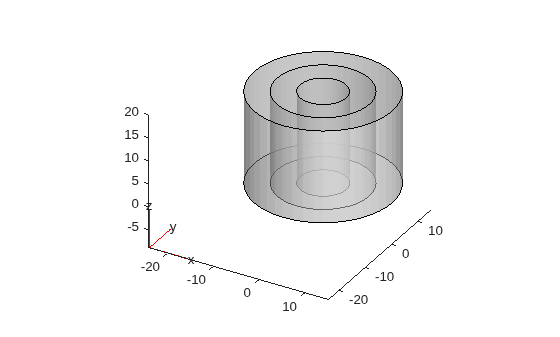
Create the geometry consisting of three cylinders of the same height by using the multicylinder function.
gm = multicylinder([5 10 15],20)
gm =
  DiscreteGeometry with properties:

       NumCells: 3
       NumFaces: 9
       NumEdges: 6
    NumVertices: 6
       Vertices: [6×3 double]
Plot the geometry.
pdegplot(gm,FaceAlpha=0.5)
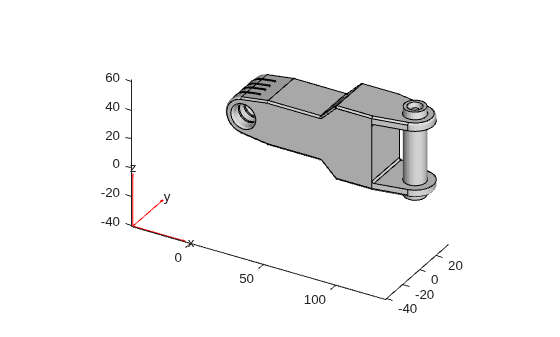
Import a geometry from an STL geometry file.
gm = importGeometry("ForearmLink.stl")gm =
DiscreteGeometry with properties:
NumCells: 1
NumFaces: 147
NumEdges: 329
NumVertices: 213
Vertices: [213×3 double]
Plot the geometry,
pdegplot(gm)
Since R2026a
Create a geometry by cutting out multiple cubes from a cylinder.
First, create geometries representing a cylinder and a unit cube.
gmcyl = fegeometry(multicylinder(1,1));
gmcube = fegeometry(multicuboid(1,1,1));
Create a vector of geometries by rotating the cube by 30 and 60 degrees.
angle = [0 30 60];
for k = 1:numel(angle)
    gv(k) = rotate(gmcube,angle(k));
end
Subtract the resulting vector of geometries from the cylinder.
gm = subtract(gmcyl,gv)
gm =
  fegeometry with properties:

        NumCells: 1
        NumFaces: 27
        NumEdges: 74
     NumVertices: 50
        Vertices: [50×3 double]
    FeatureAngle: 44
            Mesh: []
Plot the resulting geometry.
pdegplot(gm)
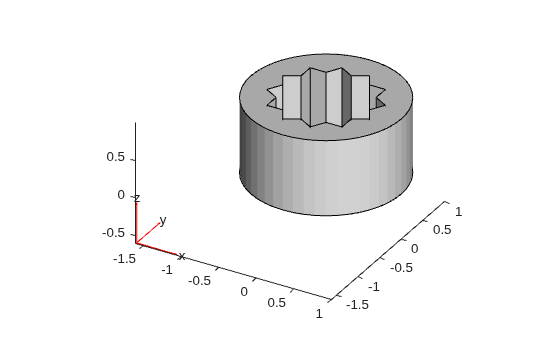
The resulting geometry is an fegeometry object. You can use this object to define a geometry for an femodel object or batteryP2DModel object. To use this geometry with a PDEModel object for solving general PDEs, convert the geometry to a DiscreteGeometry object.
gm = discreteGeometry(gm)
gm =
  DiscreteGeometry with properties:

       NumCells: 1
       NumFaces: 27
       NumEdges: 74
    NumVertices: 50
       Vertices: [50×3 double]
Create a PDE model and include the geometry in the model.
model = createpde;
model.Geometry = gm
model =
  PDEModel with properties:

           PDESystemSize: 1
         IsTimeDependent: 0
                Geometry: [1×1 DiscreteGeometry]
    EquationCoefficients: []
      BoundaryConditions: []
       InitialConditions: []
                    Mesh: []
           SolverOptions: [1×1 pde.PDESolverOptions]
Version History
Introduced in R2015aSee Also
Functions
addFace|addVertex|mergeCells|geometryFromMesh|importGeometry|multicuboid|multicylinder|multisphere

