Export Classification Model to MATLAB Coder to Generate C/C++ Code
R2026bAfter you train a model in the Classification Learner app, you can export it to MATLAB® Coder™. Then, you can generate C/C++ code for prediction with new data.
The table below lists the classification models that support code generation.
Note
Models that are trained with
nominalorordinalarrays are not supported for code generation. Convertnominalandordinalarrays to Categorical Arrays before loading your data into the Classification Learner app.You can generate C/C++ code for prediction using the binary GLM logistic regression model. However, because the underlying model for binary GLM logistic regression is a
GeneralizedLinearModelobject, this process requires you to add extra lines of code in the prediction entry-point function to convert numeric predictions to class predictions. For an example, see Code Generation for Binary GLM Logistic Regression Model Trained in Classification Learner.
To export a model from Classification Learner to MATLAB Coder:
Train all models that are supported for code generation. On the Learn tab, in the Models section, click All Codegen Supported. In the Train section, click Train All.
Select a trained model in the Models pane. In the Export section, click Export and select Export Model to Coder.
In the Export Classification Model to Coder dialog box, edit the names of the entry-point function file, the trained machine learning model file, and the sample predictor data file, if necessary. You can specify the entry-point function to accept a single data set or a list of individual predictors. Enter a name for your coder project, and select a folder for your project files. Ensure that Open MATLAB Coder app after export is selected and click Export.
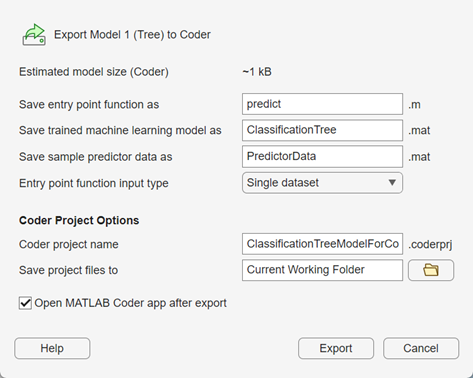
In the Export Classification Model to Coder dialog box, click OK.

The app automatically sets the following project configuration options in MATLAB Coder:
The default coder project build type is MEX file.
The entry-point function is prepopulated.
The data input types are configured using sample predictor data with variable-size input; that is, a variable number of observations can be passed to generated code (see Specify Variable-Size Arguments for Code Generation of Machine Learning Models). The sample predictor data file contains a maximum of 200 observations from the app training data set.
The project is prepared for code generation.
In the MATLAB Coder tab of the MATLAB window, click Generate Code and Build. For more information on generating code with MATLAB Coder, see Get Started with MATLAB Coder (MATLAB Coder).
In some cases, you might need to export your trained model to the MATLAB workspace and use the saveLearnerForCoder, loadLearnerForCoder, and codegen (MATLAB Coder) functions to generate code. For example, you might want to add
custom instructions in your entry-point function prior to generating code. For detailed
examples, see Generate Code at Command Line Using Model Exported from Machine Learning App and Code Generation for Binary GLM Logistic Regression Model Trained in Classification Learner. For more
information on Statistics and Machine Learning Toolbox™ functions that support C/C++ code generation, see Code Generation for Statistics and Machine Learning Functions.
See Also
Topics
- Start a Classification Learner or Regression Learner Session
- Train Classification Models in Classification Learner App
- Export Classification Model to Predict New Data
- Export Classification Model to Make Predictions in Simulink
- Export Classification Model for Deployment to MATLAB Production Server
- Generate MATLAB Code to Train Model with New Data

