Results for

Whenever a problem repeats in cycles (like indexing or angles), mod() keeps your logic clean:
idx = mod(i-1, n) + 1;
No if-else chaos!

The toughest problem in the Cody Contest 2025 is Clueless - Lord Ned in the Game Room. Thank you Matt Tearle for such as wonderful problem. We can approach this clueless(!) tough problem systematically.
Initialize knowledge Matrix
Based on the hints provided in the problem description, we can initialize a knowledge matrix of size n*3 by m+1. The rows of the knowledge matrix represent the different cards and the columns represent the players. In the knowledge matrix, the first n rows represent category 1 cards, the next n rows, category 2 and the next category 3. We can initialize this matrix with zeros. On the go, once we know that a player holds the card, we can make that entry as 1 and if a player doesn't have the card, we can make that entry as -1.
yourcards processing
These are cards received by us.
- In the knowledge matrix, mark the entries as 1 for the cards received. These entries will be the some elements along the column pnum of the knowledge matrix.
- Mark all other entries along the column pnum as -1, as we don't receive other cards.
- Mark all other entries along the rows corresponding to the received cards as -1, as other players cannot receive the cards that are with us.
commoncards processing
These are the common cards kept open.
- In the knowledge matrix, mark the entries as 1 for the common cards. These entries will be some elements along the column (m+1) of the knowledge matrix.
- Mark all other entries along the column (m+1) as -1, as other cards are not common.
- Mark all other entries along the rows corresponding to the common cards as -1, as other players cannot receive the cards that are common.
Result -1 processing
In the turns input matrix, the result (5th column) value -1 means, the corresponding player doesn't have the 3 cards asked.
- Find all the rows with result as -1.
- For those corresponding players (1st element in each row of turns matrix), mark -1 entries in the knowledge matrix for those 3 absent cards.
pnum turns processing
These are our turns, so we get definite answers for the asked cards. Make sure to traverse only the rows corresponding to our turn.
- The results with -1 are already processed in the previous step.
- The results other than -1 means, that particular card is present with the asked player. So mark the entry as 1 for the corresponding player in the knowledge matrix.
- Mark all other entries along the row corresponding to step 2 as -1, as other players cannot receive this card.
Result 0 processing
So far, in the yourcards processing, commoncards processing, result -1 processing and pnum turns processing, we had very straightforward definite knowledge about the presence/absence of the card with a player. This step onwards, the tricky part of the problem begins.
result 0 means, any one (or more) of the asked cards are present with the asked player. We don't know exactly which card.
- For the asked player, if we have a definite no answer (-1 value in the knowledge matrix) for any two of the three asked cards, then we are sure about the card that is present with the player.
- Mark the entry as 1 for the definitely known card for the corresponding player in the knowledge matrix.
- Mark all other entries along the row corresponding to step 2 as -1, as other players cannot receive this card.
Cards per Player processing
Based on the number of cards present in the yourcards, we know the ncards, the number of cards per player.
Check along each column of the knowledge matrix, that is for each player.
- If the number of ones (definitely present cards) is equal to ncards, we can make all other entries along the column as -1, as this player cannot have any other card.
- If the sum of number of ones (definitely present cards) and the number of zeros (unknown cards) is equal to ncards, we can (i) mark the zero entries as one, as the unknown cards have become definitely present cards, (ii) mark all other entries along the column as -1, as other players cannot have any other card.
Category-wise cards checking
For each category, we must get a definite card to be present in the envelope.
- In each category (For every group of n rows of knowledge matrix), check for a row with all -1s. That is a card which is definitely not present with any of the players. Then this card will surely be present in the envelope. Add it to the output.
- If we could not find an all -1 row, then in that category, check each row for a 1 to be present. Note down the rows which doesn't have a 1. Those cards' players are still unknown. If we have only one such row (unknown card), then it must be in the envelope, as from each category one card is present in the envelope. Add it to the output.
- For the card identified in Step 2, mark all the entries along that row in the knowledge matrix as -1, as this card doesn't belong to any player.
Looping Over
In our so far steps, we could note that, the knowledge matrix got updated even after "Result 0 processing" step. This updation in the knowledge matrix may help the "Result 0 processing" step, if we perform it again. So, we can loop over the steps, "Result 0 processing", "Cards per Player processing" and "Category-wise cards checking" again. This ensures that, we will get the desired number of envelop cards (three in our case) as output.

Experimenting with Agentic AI
44%
I am an AI skeptic
0%
AI is banned at work
11%
I am happy with Conversational AI
44%
9 votes
Instead of growing arrays inside a loop, preallocate with zeros(), ones(), or nan(). It avoids memory fragmentation and speeds up Cody solutions.
A = zeros(1,1000);
Cody often hides subtle hints in example outputs — like data shape, rounding, or format. Matching those exactly saves you a lot of debugging time.
isequal() is your best friend for Cody! It compares arrays perfectly without rounding errors — much safer than == for matrix outputs.
When Cody hides test cases, test your function with random small inputs first. If it works for many edge cases, it will almost always pass the grader.
I realized that using vectorized logic instead of nested loops makes Cody problems run much faster and cleaner. Functions like any(), all(), and logical indexing can replace multiple for-loops easily !

Hi cool guys,
I hope you are coding so cool!
FYI, in Problem 61065. Convert Hexavigesimal to Decimal in Cody Contest 2025 there's a small issue with the text:
[ ... For example, the text ‘aloha’ would correspond to a vector of values [0 11 14 7 0], thus representing the base-26 value 202982 = 11*263 + 14*262 + 7*26 ...]
The bold section should be:
202982 = 11*26^3 + 14*26^2 + 7*26

If you have solved a Cody problem before, you have likely seen the Scratch Pad text field below the Solution text field. It provides a quick way to get feedback on your solution before submitting it. Since submitting a solution takes you to a new page, any time a wrong solution is submitted, you have to navigate back to the problem page to try it again.
Instead, I use the Scratch Pad to test my solution repeatedly before submitting. That way, I get to a working solution faster without having to potentially go back and forth many times between the problem page and the wrong-solution page.
Here is my approach:
- Write a tentative solution.
- Copy a test case from the test suite into the Scratch Pad.
- Click the Run Function button—this is immediately below the Scratch Pad and above the Output panel and Submit buttons.
- If the solution does not work, modify the solution code, sometimes putting in disp() lines and/or removing semicolons to trace what the code is doing. Repeat until the solution passes.
- If the solution does work, repeat steps 2 through 4.
- Once there are no more test cases to copy and paste, clean up the code, if necessary (delete disp lines, reinstate all semicolons to suppress output). Click the Run Function button once more, just to make sure I did not break the solution while cleaning it up. Then, click the Submit button.
For problems with large test suites, you may find it useful to copy and paste in multiple test cases per iteration.
Hopefully you find this useful.

Run MATLAB using AI applications by leveraging MCP. This MCP server for MATLAB supports a wide range of coding agents like Claude Code and Visual Studio Code.
Check it out and share your experiences below. Have fun!
GitHub repo: https://github.com/matlab/matlab-mcp-core-server
Yann Debray's blog post: https://blogs.mathworks.com/deep-learning/2025/11/03/releasing-the-matlab-mcp-core-server-on-github/

Hey Cool Coders! 😎
Let’s get to know each other. Drop a quick intro below and meet your teammates! This is your chance to meet teammates, find coding buddies, and build connections that make the contest more fun and rewarding!
You can share:
- Your name or nickname
- Where you’re from
- Your favorite coding topic or language
- What you’re most excited about in the contest
Let’s make Team Cool Coders an awesome community—jump in and say hi! 🚀
Welcome to the Cody Contest 2025 and the Cool Coders team channel! 🎉
You stay calm under pressure. No panic, no chaos—just smooth problem-solving. This is your space to connect with like-minded coders, share insights, and help your team win. To make sure everyone has a great experience, please keep these tips in mind:
- Follow the Community Guidelines: Take a moment to review our community standards. Posts that don’t follow these guidelines may be flagged by moderators or community members.
- Ask Questions About Cody Problems: When asking for help, show your work! Include your code, error messages, and any details needed to reproduce your results. This helps others provide useful, targeted answers.
- Share Tips & Tricks: Knowledge sharing is key to success. When posting tips or solutions, explain how and why your approach works so others can learn your problem-solving methods.
- Provide Feedback: We value your feedback! Use this channel to report issues or share creative ideas to make the contest even better.
Have fun and enjoy the challenge! We hope you’ll learn new MATLAB skills, make great connections, and win amazing prizes! 🚀

как я получил api Token

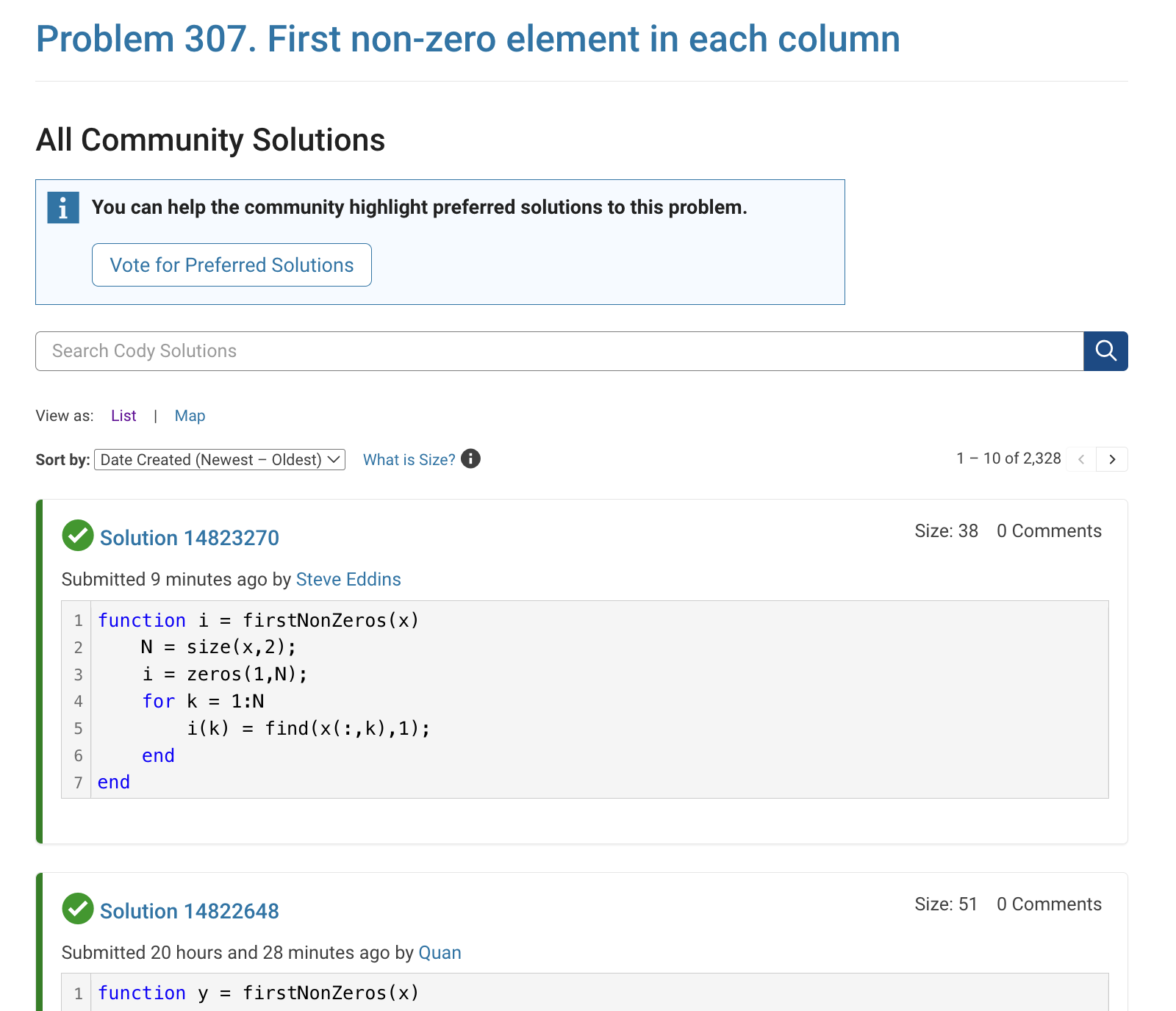
The all-community-solutions view shows the ID of each solution, and you can click on the link to go to the solution.
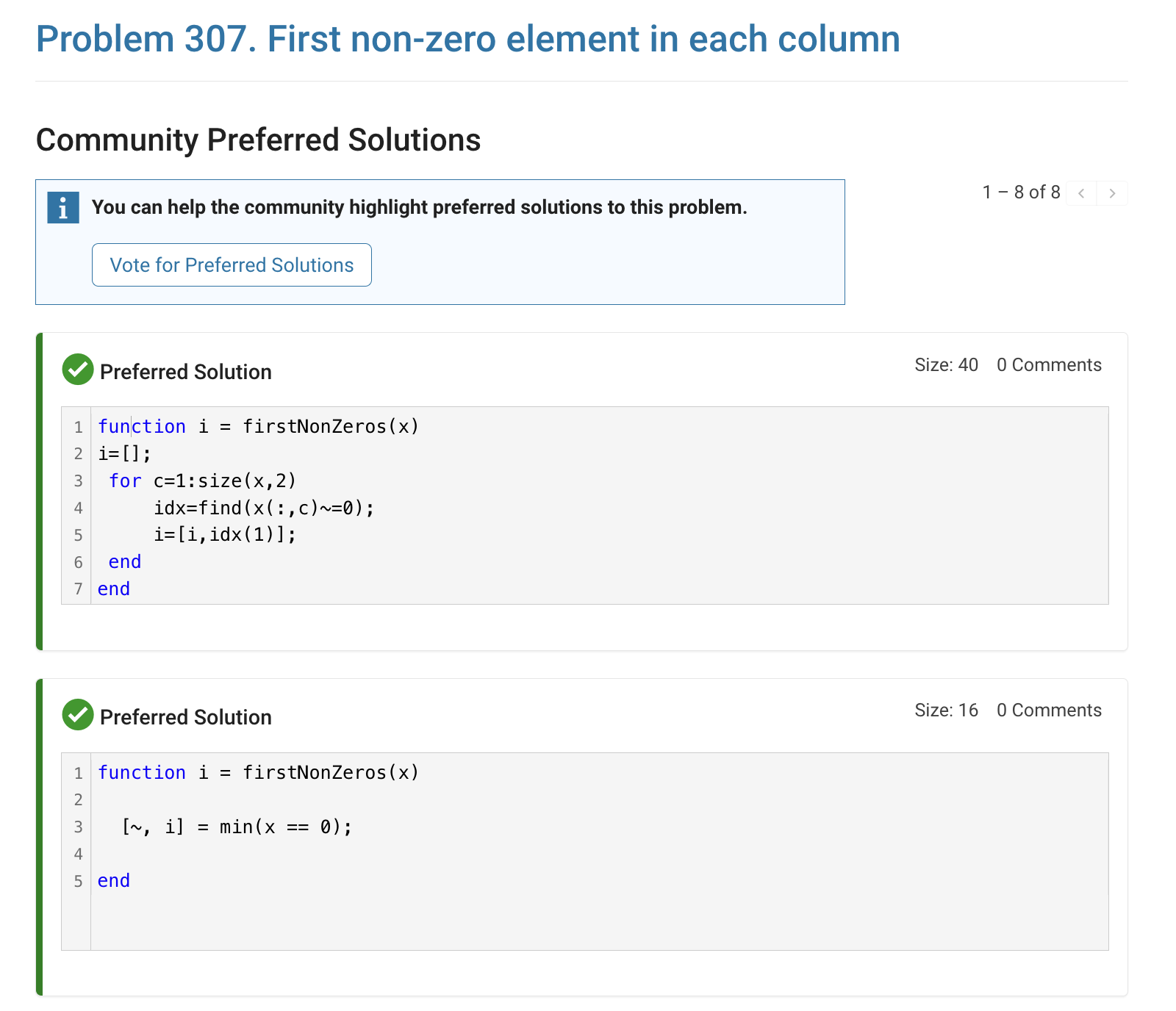
The preferred-community-solutions view does not show the solution IDs and does not link to the solutions. As far as I can tell, there is no way to get from that view to the solutions. If, for example, you want to go to the solution to leave a comment there, you can't.
All-community-solutions view:
Preferred-community-solutions view, with no solution IDs and no links:

Hi cody fellows,
I already solved more than 500 problems -months ago, last july if I remember well- and get this scholar badge, but then it suddenly disappeared a few weeks later. I then solved a few more problems and it reappeared.
Now I observed it disappeared once more a few days ago.
Have you also noticed this erratic behavior of the scholar badge ? Is it normal and / or intentional ? If not, how to explain it ? (deleted problems ?)
Cheers,
Nicolas
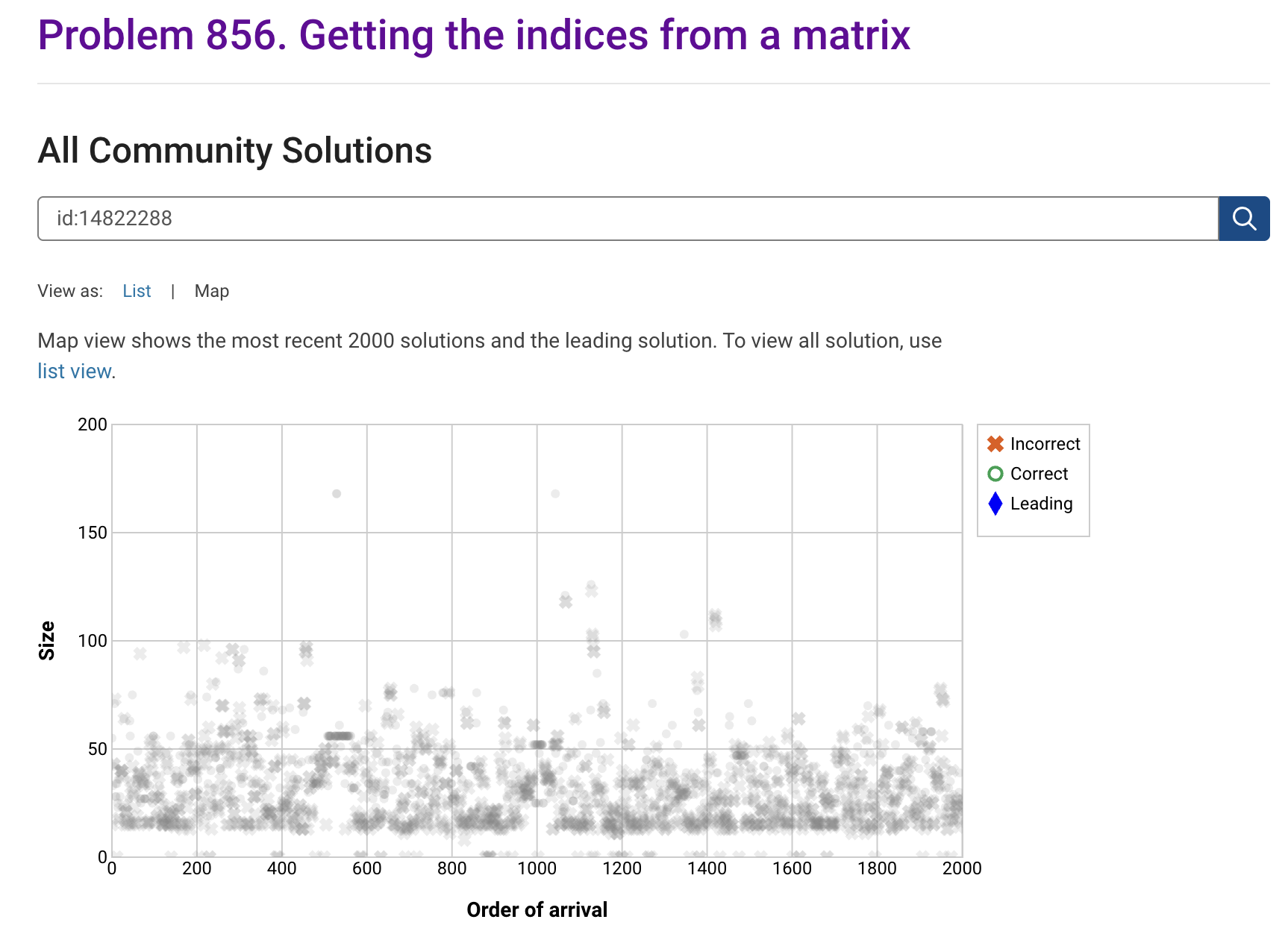
I'm seeing solution maps shown with low-contrast gray colors instead of the correct symbol colors. I have observed this using both Safari and Chrome. Screenshot:
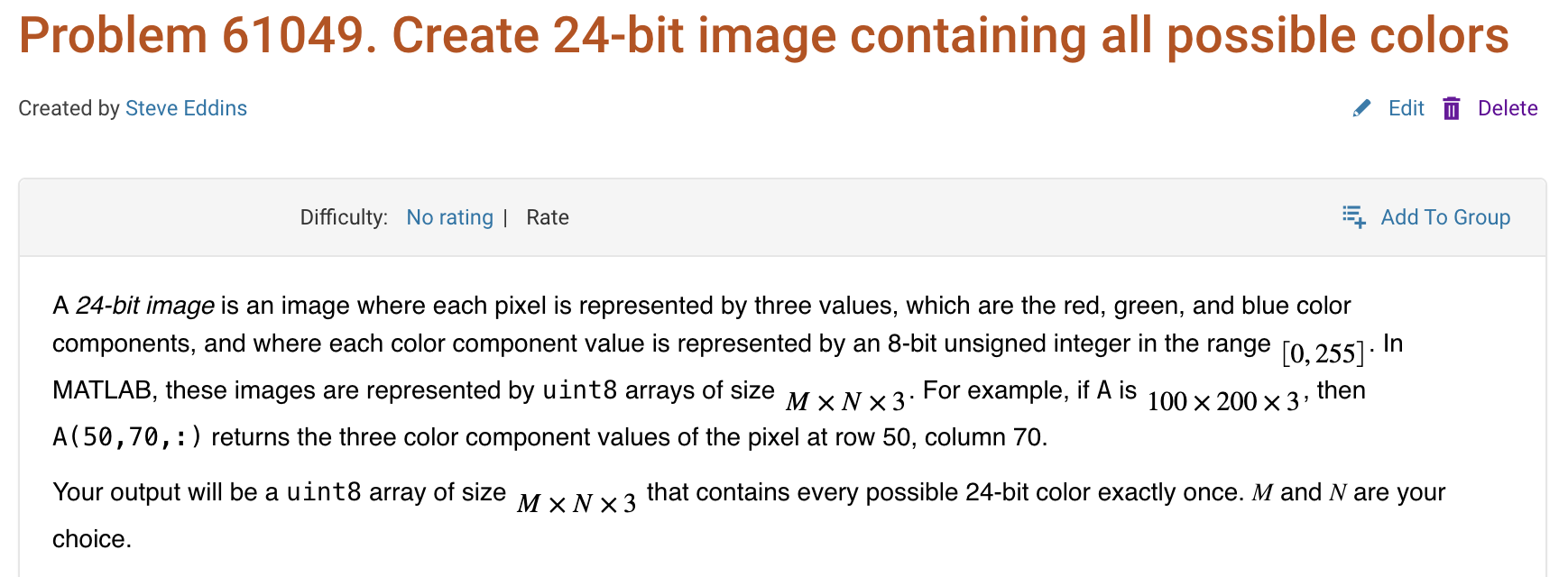
Here is a screenshot of a Cody problem that I just created. The math rendering is poor. (I have since edited the problem to remove the math formatting.)
Are there any code restrictions for programming Cody solutions? I could not find anything mentioned at https://www.mathworks.com/matlabcentral/content/cody/about.html, other than toolbox functions not being available.

Hey everyone,
I’m currently working with MATLAB R2025b and using the MQTT blocks from the Industrial Communication Toolbox inside Simulink. I’ve run into an issue that’s driving me a bit crazy, and I’m not sure if it’s a bug or if I’m missing something obvious.
Here’s what’s happening:
- I open the MQTT Configure block.
- I fill out all the required fields — Broker address, Port, Client ID, Username, and Password.
- When I click Test Connection, it says “Connection established successfully.” So far so good.
- Then I click Apply, close the dialog, set the topic name, and try to run the simulation.
- At this point, I get the following error:Caused by: Invalid value for 'ClientID', 'Username' or 'Password'.
- When I reopen the MQTT config block, I notice that the Password field is empty again — even though I definitely entered it before and the connection test worked earlier.
It seems like Simulink is somehow not saving the password after hitting Apply, which leads to the authentication error during simulation.
Has anyone else faced this? Is this a bug in R2025b, or do I need to configure something differently to make the password persist?
Would really appreciate any insights, workarounds, or confirmations from anyone who has used MQTT in Simulink recently.
Thanks in advance!

