Main Content

Results for

The toughest problem in the Cody Contest 2025 is Clueless - Lord Ned in the Game Room. Thank you Matt Tearle for such as wonderful problem. We can approach this clueless(!) tough problem systematically.
Initialize knowledge Matrix
Based on the hints provided in the problem description, we can initialize a knowledge matrix of size n*3 by m+1. The rows of the knowledge matrix represent the different cards and the columns represent the players. In the knowledge matrix, the first n rows represent category 1 cards, the next n rows, category 2 and the next category 3. We can initialize this matrix with zeros. On the go, once we know that a player holds the card, we can make that entry as 1 and if a player doesn't have the card, we can make that entry as -1.
yourcards processing
These are cards received by us.
  1. In the knowledge matrix, mark the entries as 1 for the cards received. These entries will be the some elements along the column pnum of the knowledge matrix.
  2. Mark all other entries along the column pnum as -1, as we don't receive other cards.
  3. Mark all other entries along the rows corresponding to the received cards as -1, as other players cannot receive the cards that are with us.
commoncards processing
These are the common cards kept open.
  1. In the knowledge matrix, mark the entries as 1 for the common cards. These entries will be some elements along the column (m+1) of the knowledge matrix.
  2. Mark all other entries along the column (m+1) as -1, as other cards are not common.
  3. Mark all other entries along the rows corresponding to the common cards as -1, as other players cannot receive the cards that are common.
Result -1 processing
In the turns input matrix, the result (5th column) value -1 means, the corresponding player doesn't have the 3 cards asked.
  1. Find all the rows with result as -1.
  2. For those corresponding players (1st element in each row of turns matrix), mark -1 entries in the knowledge matrix for those 3 absent cards.
pnum turns processing
These are our turns, so we get definite answers for the asked cards. Make sure to traverse only the rows corresponding to our turn.
  1. The results with -1 are already processed in the previous step.
  2. The results other than -1 means, that particular card is present with the asked player. So mark the entry as 1 for the corresponding player in the knowledge matrix.
  3. Mark all other entries along the row corresponding to step 2 as -1, as other players cannot receive this card.
Result 0 processing
So far, in the yourcards processing, commoncards processing, result -1 processing and pnum turns processing, we had very straightforward definite knowledge about the presence/absence of the card with a player. This step onwards, the tricky part of the problem begins.
result 0 means, any one (or more) of the asked cards are present with the asked player. We don't know exactly which card.
  1. For the asked player, if we have a definite no answer (-1 value in the knowledge matrix) for any two of the three asked cards, then we are sure about the card that is present with the player.
  2. Mark the entry as 1 for the definitely known card for the corresponding player in the knowledge matrix.
  3. Mark all other entries along the row corresponding to step 2 as -1, as other players cannot receive this card.
Cards per Player processing
Based on the number of cards present in the yourcards, we know the ncards, the number of cards per player.
Check along each column of the knowledge matrix, that is for each player.
  1. If the number of ones (definitely present cards) is equal to ncards, we can make all other entries along the column as -1, as this player cannot have any other card.
  2. If the sum of number of ones (definitely present cards) and the number of zeros (unknown cards) is equal to ncards, we can (i) mark the zero entries as one, as the unknown cards have become definitely present cards, (ii) mark all other entries along the column as -1, as other players cannot have any other card.
Category-wise cards checking
For each category, we must get a definite card to be present in the envelope.
  1. In each category (For every group of n rows of knowledge matrix), check for a row with all -1s. That is a card which is definitely not present with any of the players. Then this card will surely be present in the envelope. Add it to the output.
  2. If we could not find an all -1 row, then in that category, check each row for a 1 to be present. Note down the rows which doesn't have a 1. Those cards' players are still unknown. If we have only one such row (unknown card), then it must be in the envelope, as from each category one card is present in the envelope. Add it to the output.
  3. For the card identified in Step 2, mark all the entries along that row in the knowledge matrix as -1, as this card doesn't belong to any player.
Looping Over
In our so far steps, we could note that, the knowledge matrix got updated even after "Result 0 processing" step. This updation in the knowledge matrix may help the "Result 0 processing" step, if we perform it again. So, we can loop over the steps, "Result 0 processing", "Cards per Player processing" and "Category-wise cards checking" again. This ensures that, we will get the desired number of envelop cards (three in our case) as output.
Hoping to see, many of you to finish Cody Contest 2025 and make our team win the trophy.
Experimenting with Agentic AI
44%
I am an AI skeptic
0%
AI is banned at work
11%
I am happy with Conversational AI
44%
9 votes
Instead of growing arrays inside a loop, preallocate with zeros(), ones(), or nan(). It avoids memory fragmentation and speeds up Cody solutions.
A = zeros(1,1000);
Cody often hides subtle hints in example outputs — like data shape, rounding, or format. Matching those exactly saves you a lot of debugging time.
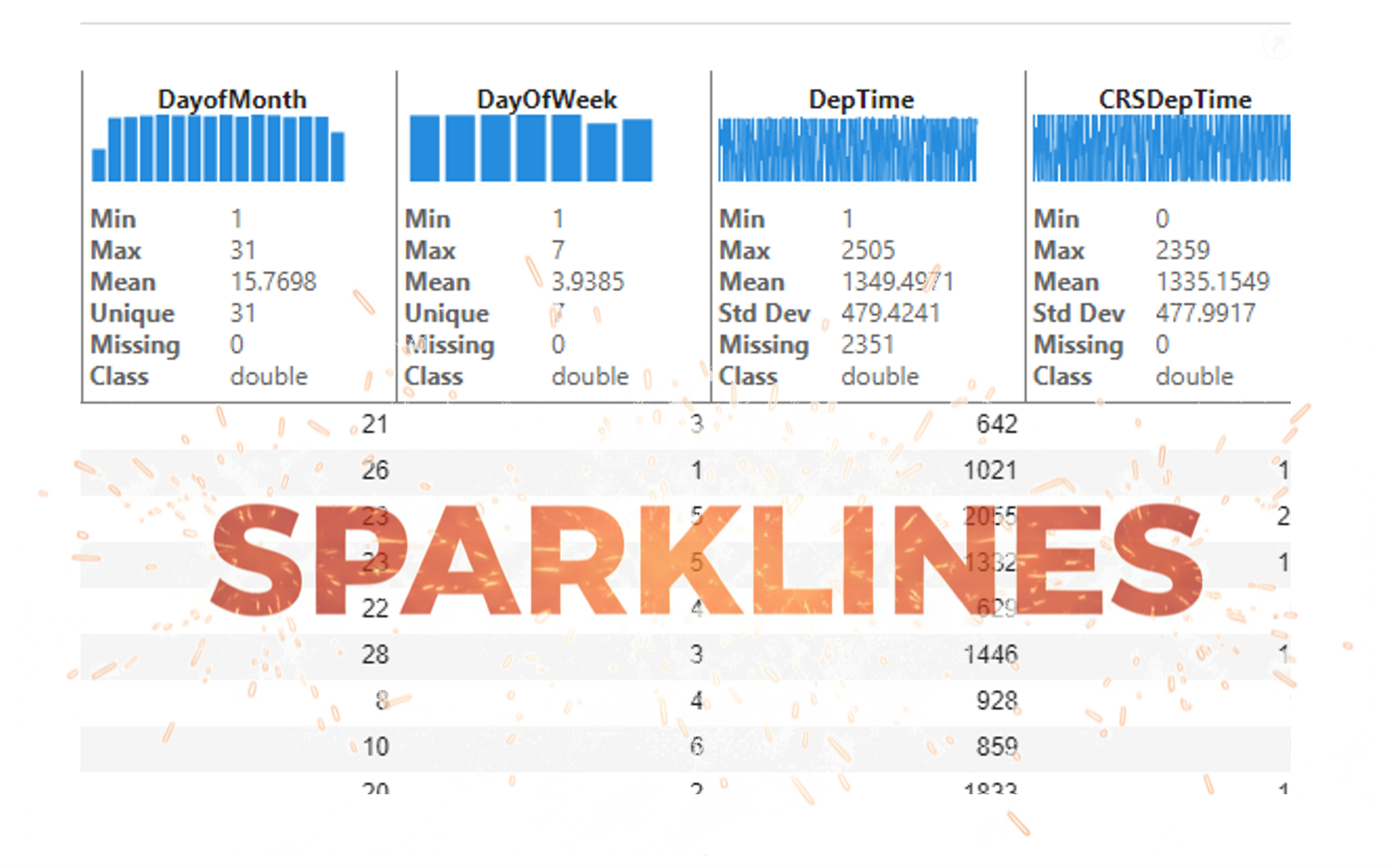
It’s exciting to dive into a new dataset full of unfamiliar variables but it can also be overwhelming if you’re not sure where to start. Recently, I discovered some new interactive features in MATLAB live scripts that make it much easier to get an overview of your data. With just a few clicks, you can display sparklines and summary statistics using table variables, sort and filter variables, and even have MATLAB generate the corresponding code for reproducibility.
The Graphics and App Building blog published an article that walks through these features showing how to explore, clean, and analyze data—all without writing any code.
If you’re interested in streamlining your exploratory data analysis or want to see what’s new in live scripts, you might find it helpful:
If you’ve tried these features or have your own tips for quick data exploration in MATLAB, I’d love to hear your thoughts!
isequal() is your best friend for Cody! It compares arrays perfectly without rounding errors — much safer than == for matrix outputs.
When Cody hides test cases, test your function with random small inputs first. If it works for many edge cases, it will almost always pass the grader.
I realized that using vectorized logic instead of nested loops makes Cody problems run much faster and cleaner. Functions like any(), all(), and logical indexing can replace multiple for-loops easily !
Hi cool guys,
I hope you are coding so cool!
FYI, in Problem 61065. Convert Hexavigesimal to Decimal in Cody Contest 2025 there's a small issue with the text:
[ ... For example, the text ‘aloha’ would correspond to a vector of values [0 11 14 7 0], thus representing the base-26 value 202982 = 11*263 + 14*262 + 7*26 ...]
The bold section should be:
202982 = 11*26^3 + 14*26^2 + 7*26
From my experience, MATLAB's Deep Learning Toolbox is quite user-friendly, but it still falls short of libraries like PyTorch in many respects. Most users tend to choose PyTorch because of its flexibility, efficiency, and rich support for many mathematical operators. In recent years, the number of dlarray-compatible mathematical functions added to the toolbox has been very limited, which makes it difficult to experiment with many custom networks. For example, svd is currently not supported for dlarray inputs.
This link (List of Functions with dlarray Support - MATLAB & Simulink) lists all functions that support dlarray as of R2026a — only around 200 functions (including toolbox-specific ones). I would like to see support for many more fundamental mathematical functions so that users have greater freedom when building and researching custom models. For context, the core MATLAB mathematics module contains roughly 600 functions, and many application domains build on that foundation.
I hope MathWorks will prioritize and accelerate expanding dlarray support for basic math functions. Doing so would significantly increase the Deep Learning Toolbox's utility and appeal for researchers and practitioners.
Thank you.
Run MATLAB using AI applications by leveraging MCP. This MCP server for MATLAB supports a wide range of coding agents like Claude Code and Visual Studio Code.
Check it out and share your experiences below. Have fun!
Hey Cool Coders! 😎
Let’s get to know each other. Drop a quick intro below and meet your teammates! This is your chance to meet teammates, find coding buddies, and build connections that make the contest more fun and rewarding!
You can share:
  • Your name or nickname
  • Where you’re from
  • Your favorite coding topic or language
  • What you’re most excited about in the contest
Let’s make Team Cool Coders an awesome community—jump in and say hi! 🚀
Welcome to the Cody Contest 2025 and the Cool Coders team channel! 🎉
You stay calm under pressure. No panic, no chaos—just smooth problem-solving. This is your space to connect with like-minded coders, share insights, and help your team win. To make sure everyone has a great experience, please keep these tips in mind:
  1. Follow the Community Guidelines: Take a moment to review our community standards. Posts that don’t follow these guidelines may be flagged by moderators or community members.
  2. Ask Questions About Cody Problems: When asking for help, show your work! Include your code, error messages, and any details needed to reproduce your results. This helps others provide useful, targeted answers.
  3. Share Tips & Tricks: Knowledge sharing is key to success. When posting tips or solutions, explain how and why your approach works so others can learn your problem-solving methods.
  4. Provide Feedback: We value your feedback! Use this channel to report issues or share creative ideas to make the contest even better.
Have fun and enjoy the challenge! We hope you’ll learn new MATLAB skills, make great connections, and win amazing prizes! 🚀
как я получил api Token
David
David
Last activity on 8 Dec 2025 at 15:44

I just learned you can access MATLAB Online from the following shortcut in your web browser: https://matlab.new
Hey everyone,
I’m currently working with MATLAB R2025b and using the MQTT blocks from the Industrial Communication Toolbox inside Simulink. I’ve run into an issue that’s driving me a bit crazy, and I’m not sure if it’s a bug or if I’m missing something obvious.
Here’s what’s happening:
  • I open the MQTT Configure block.
  • I fill out all the required fields — Broker address, Port, Client ID, Username, and Password.
  • When I click Test Connection, it says “Connection established successfully.” So far so good.
  • Then I click Apply, close the dialog, set the topic name, and try to run the simulation.
  • At this point, I get the following error:Caused by: Invalid value for 'ClientID', 'Username' or 'Password'.
  • When I reopen the MQTT config block, I notice that the Password field is empty again — even though I definitely entered it before and the connection test worked earlier.
It seems like Simulink is somehow not saving the password after hitting Apply, which leads to the authentication error during simulation.
Has anyone else faced this? Is this a bug in R2025b, or do I need to configure something differently to make the password persist?
Would really appreciate any insights, workarounds, or confirmations from anyone who has used MQTT in Simulink recently.
Thanks in advance!
I'm working on training neural networks without backpropagation / automatic differentiation, using locally derived analytic forms of update rules. Given that this allows a direct formula to be derived for the update rule, it removes alot of the overhead that is otherwise required from automatic differentiation.
However, matlab's functionalities for neural networks are currently solely based around backpropagation and automatic differentiation, such as the dlgradient function and requiring everything to be dlarrays during training.
I have two main requests, specifically for functions that perform a single operation within a single layer of a neural network, such as "dlconv", "fullyconnect", "maxpool", "avgpool", "relu", etc:
  • these functions should also allow normal gpuArray data instead of requiring everything to be dlarrays.
  • these functions are currently designed to only perform the forward pass. I request that these also be designed to perform the backward pass if user requests. There can be another input user flag that can be "forward" (default) or "backward", and then the function should have all the necessary inputs to perform that operation (e.g. for "avgpool" forward pass it only needs the avgpool input data and the avgpool parameters, but for the "avgpool" backward pass it needs the deriviative w.r.t. the avgpool output data, the avgpool parameters, and the original data dimensions). I know that there is a maxunpool function that achieves this for maxpool, but it has significant issues when trying to use it this way instead of by backpropagation in a dlgradient type layer, see (https://www.mathworks.com/matlabcentral/answers/2179587-making-a-custom-way-to-train-cnns-and-i-am-noticing-that-avgpool-is-significantly-faster-than-maxpo?s_tid=srchtitle).
I don't know how many people would benefit from this feature, and someone could always spend their time creating these functionalities themselves by matlab scripts, cuDNN mex, etc., but regardless it would be nice for matlab to have this allowable for more customizable neural net training.
Edit 15 Oct 2025: Removed incorrect code. Replaced symmatrix2sym and symfunmatrix2symfun with sym and symfun respectively (latter supported as of 2024b).
The Symbolic Math Toolbox does not have its own dot and and cross functions. That's o.k. (maybe) for garden variety vectors of sym objects where those operations get shipped off to the base Matlab functions
x = sym('x',[3,1]); y = sym('y',[3,1]);
which dot(x,y)
/MATLAB/toolbox/matlab/specfun/dot.m
dot(x,y)
ans = 
which cross(x,y)
/MATLAB/toolbox/matlab/specfun/cross.m
cross(x,y)
ans = 
But now we have symmatrix et. al., and things don't work as nicely
clearvars
x = symmatrix('x',[3,1]); y = symmatrix('y',[3,1]);
z = symmatrix('z',[1,1]);
sympref('AbbreviateOutput',false);
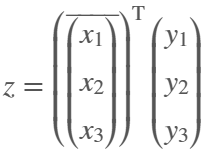
dot() expands the result, which isn't really desirable for exposition.
eqn = z == dot(x,y)
eqn = 
Also, dot() returns the the result in terms of the conjugate of x, which can't be simplifed away at the symmatrix level
assumeAlso(sym(x),'real')
class(eqn)
ans = 'symmatrix'
try
eqn = z == simplify(dot(x,y))
catch ME
ME.message
end
ans = 'Undefined function 'simplify' for input arguments of type 'symmatrix'.'
To get rid of the conjugate, we have to resort to sym
eqn = simplify(sym(eqn))
eqn = 
but again we are in expanded form, which defeats the purpose of symmatrix (et. al.)
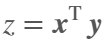
But at least we can do this to get a nice equation
eqn = z == x.'*y
eqn = 
dot errors with symfunmatrix inputs
clearvars
syms t real
x = symfunmatrix('x(t)',t,[3,1]); y = symfunmatrix('y(t)',t,[3,1]);
try
dot(x,y)
catch ME
ME.message
end
ans = 'Invalid argument at position 2. Symbolic function is evaluated at the input arguments and does not accept colon indexing. Instead, use FORMULA on the function and perform colon indexing on the returned output.'
Cross works (accidentally IMO) with symmatrix, but expands the result, which isn't really desirable for exposition
clearvars
x = symmatrix('x',[3,1]); y = symmatrix('y',[3,1]);
z = symmatrix('z',[3,1]);
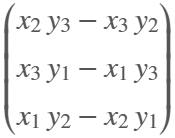
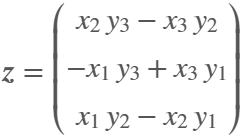
eqn = z == cross(x,y)
eqn = 
And it doesn't work at all if an input is a symfunmatrix
syms t
w = symfunmatrix('w(t)',t,[3,1]);
try
eqn = z == cross(x,w);
catch ME
ME.message
end
ans = 'A and B must be of length 3 in the dimension in which the cross product is taken.'
In the latter case we can expand with
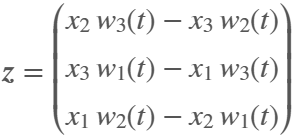
eqn = z == cross(sym(x),symfun(w)) % x has to be converted
eqn(t) = 
But we can't do the same with dot (as shown above, dot doesn't like symfun inputs)
try
eqn = z == dot(sym(x),symfun(w))
catch ME
ME.message
end
ans = 'Invalid argument at position 2. Symbolic function is evaluated at the input arguments and does not accept colon indexing. Instead, use FORMULA on the function and perform colon indexing on the returned output.'
Looks like the only choice for dot with symfunmatrix is to write it by hand at the matrix level
x.'*w
ans(t) = 
or at the sym/symfun level
sym(x).'*symfun(w) % assuming x is real
ans(t) = 
Ideally, I'd like to see dot and cross implemented for symmatrix and symfunmatrix types where neither function would evaluate, i.e., expand, until both arguments are subs-ed with sym or symfun objects of appropriate dimension.
Also, it would be nice if symmatrix could be assumed to be real. Is there a reason why being able to do so wouldn't make sense?
try
assume(x,'real')
catch ME
ME.message
end
ans = 'Undefined function 'assume' for input arguments of type 'symmatrix'.'
What if you had no isprime utility to rely on in MATLAB? How would you identify a number as prime? An easy answer might be something tricky, like that in simpleIsPrime0.
simpleIsPrime0 = @(N) ismember(N,primes(N));
But I’ll also disallow the use of primes here, as it does not really test to see if a number is prime. As well, it would seem horribly inefficient, generating a possibly huge list of primes, merely to learn something about the last member of the list.
Looking for a more serious test for primality, I’ve already shown how to lighten the load by a bit using roughness, to sometimes identify numbers as composite and therefore not prime.
But to actually learn if some number is prime, we must do a little more. Yes, this is a common homework problem assigned to students, something we have seen many times on Answers. It can be approached in many ways too, so it is worth looking at the problem in some depth.
The definition of a prime number is a natural number greater than 1, which has only two factors, thus 1 and itself. That makes a simple test for primality of the number N easy. We just try dividing the number by every integer greater than 1, and not exceeding N-1. If any of those trial divides leaves a zero remainder, then N cannot be prime. And of course we can use mod or rem instead of an explicit divide, so we need not worry about floating point trash, as long as the numbers being tested are not too large.
simpleIsPrime1 = @(N) all(mod(N,2:N-1) ~= 0);
Of course, simpleIsPrime1 is not a good code, in the sense that it fails to check if N is an integer, or if N is less than or equal to 1. It is not vectorized, and it has no documentation at all. But it does the job well enough for one simple line of code. There is some virtue in simplicity after all, and it is certainly easy to read. But sometimes, I wish a function handle could include some help comments too! A feature request might be in the offing.
simpleIsPrime1(9931)
ans = logical
1
simpleIsPrime1(9932)
ans = logical
0
simpleIsPrime1 works quite nicely, and seems pretty fast. What could be wrong? At some point, the student is given a more difficult problem, to identify if a significantly larger integer is prime. simpleIsPrime1 will then cause a computer to grind to a distressing halt if given a sufficiently large number to test. Or it might even error out, when too large a vector of numbers was generated to test against. For example, I don't think you want to test a number of the order of 2^64 using simpleIsPrime1, as performing on the order of 2^64 divides will be highly time consuming.
uint64(2)^63-25
ans = uint64 9223372036854775783
Is it prime? I’ve not tested it to learn if it is, and simpleIsPrime1 is not the tool to perform that test anyway.
A student might realize the largest possible integer factors of some number N are the numbers N/2 and N itself. But, if N/2 is a factor, then so is 2, and some thought would suggest it is sufficient to test only for factors that do not exceed sqrt(N). This is because if a is a divisor of N, then so is b=N/a. If one of them is larger than sqrt(N), then the other must be smaller. That could lead us to an improved scheme in simpleIsPrime2.
simpleIsPrime2 = @(N) all(mod(N,2:sqrt(N)));
For an integer of the size 2^64, now you only need to perform roughly 2^32 trial divides. Maybe we might consider the subtle improvement found in simpleIsPrime3, which avoids trial divides by the even integers greater than 2.
simpleIsPrime3 = @(N) (N == 2) || (mod(N,2) && all(mod(N,3:2:sqrt(N))));
simpleIsPrime3 needs only an approximate maximum of 2^31 trial divides even for numbers as large as uint64 can represent. While that is large, it is still generally doable on the computers we have today, even if it might be slow.
Sadly, my goals are higher than even the rather lofty limit given by UINT64 numbers. The problem of course is that a trial divide scheme, despite being 100% accurate in its assessment of primality, is a time hog. Even an O(sqrt(N)) scheme is far too slow for numbers with thousands or millions of digits. And even for a number as “small” as 1e100, a direct set of trial divides by all primes less than sqrt(1e100) would still be practically impossible, as there are roughly n/log(n) primes that do not exceed n. For an integer on the order of 1e50,
1e50/log(1e50)
ans = 8.6859e+47
It is practically impossible to perform that many divides on any computer we can make today. Can we do better? Is there some more efficient test for primality? For example, we could write a simple sieve of Eratosthenes to check each prime found not exceeding sqrt(N).
function [TF,SmallPrime] = simpleIsPrime4(N)
% simpleIsPrime3 - Sieve of Eratosthenes to identify if N is prime
% [TF,SmallPrime] = simpleIsPrime3(N)
%
% Returns true if N is prime, as well as the smallest prime factor
% of N when N is composite. If N is prime, then SmallPrime will be N.
Nroot = ceil(sqrt(N)); % ceil caters for floating point issues with the sqrt
TF = true;
SieveList = true(1,Nroot+1); SieveList(1) = false;
SmallPrime = 2;
while TF
% Find the "next" true element in SieveList
while (SmallPrime <= Nroot+1) && ~SieveList(SmallPrime)
SmallPrime = SmallPrime + 1;
end
% When we drop out of this loop, we have found the next
% small prime to check to see if it divides N, OR, we
% have gone past sqrt(N)
if SmallPrime > Nroot
% this is the case where we have now looked at all
% primes not exceeding sqrt(N), and have found none
% that divide N. This is where we will drop out to
% identify N as prime. TF is already true, so we need
% not set TF.
SmallPrime = N;
return
else
if mod(N,SmallPrime) == 0
% smallPrime does divide N, so we are done
TF = false;
return
end
% update SieveList
SieveList(SmallPrime:SmallPrime:Nroot) = false;
end
end
end
simpleIsPrime4 does indeed work reasonably well, though it is sometimes a little slower than is simpleIsPrime3, and everything is hugely faster than simpleIsPrime1.
timeit(@() simpleIsPrime1(111111111))
ans = 0.6447
timeit(@() simpleIsPrime2(111111111))
ans = 1.1932e-04
timeit(@() simpleIsPrime3(111111111))
ans = 6.4815e-05
timeit(@() simpleIsPrime4(111111111))
ans = 7.5757e-06
All of those times will slow to a crawl for much larger numbers of course. And while I might find a way to subtly improve upon these codes, any improvement will be marginal in the end if I try to use any such direct approach to primality. We must look in a different direction completely to find serious gains.
At this point, I want to distinguish between two distinct classes of tests for primality of some large number. One class of test is what I might call an absolute or infallible test, one that is perfectly reliable. These are tests where if X is identified as prime/composite then we can trust the result absolutely. The tests I showed in the form of simpleIsPrime1, simpleIsPrime2, simpleIsPrime3 and aimpleIsprime4, were all 100% accurate, thus they fall into the class of infallible tests.
The second general class of test for primality is what I will call an evidentiary test. Such a test provides evidence, possibly quite strong evidence, that the given number is prime, but in some cases, it might be mistaken. I've already offered a basic example of a weak evidentiary test for primality in the form of roughness. All primes are maximally rough. And therefore, if you can identify X as being rough to some extent, this provides evidence that X is also prime, and the depth of the roughness test influences the strength of the evidence for primality. While this is generally a fairly weak test, it is a test nevertheless, and a good exclusionary test, a good way to avoid more sophisticated but time consuming tests.
These evidentiary tests all have the property that if they do identify X as being composite, then they are always correct. In the context of roughness, if X is not sufficiently rough, then X is also not prime. On the other side of the coin, if you can show X is at least (sqrt(X)+1)-rough, then it is positively prime. (I say this to suggest that some evidentiary tests for primality can be turned into truth telling tests, but that may take more effort than you can afford.) The problem is of course that is literally impossible to verify that degree of roughness for numbers with many thousands of digits.
In my next post, I'll look at the Fermat test for primality, based on Fermat's little theorem.
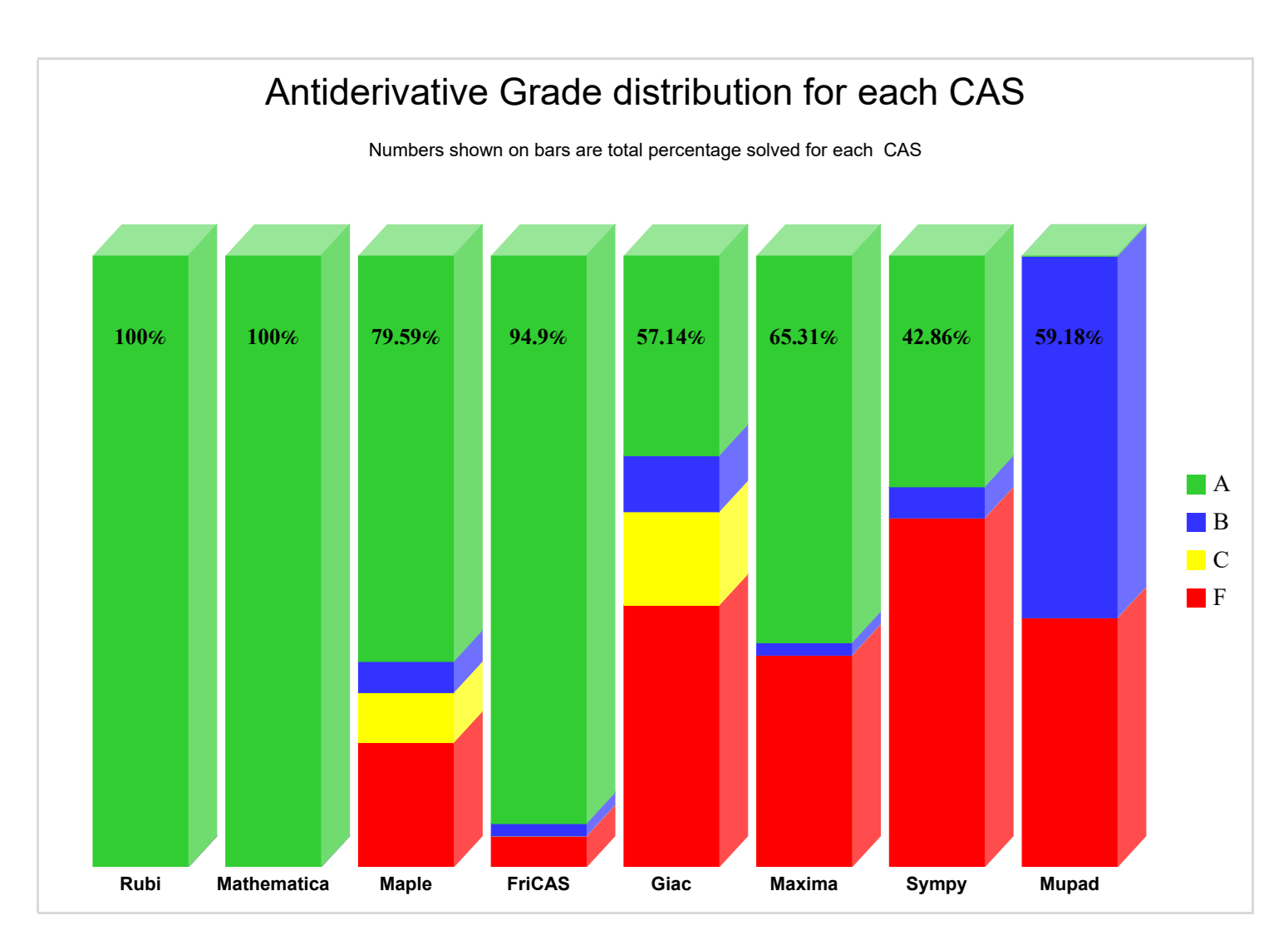
Something that I periodically wonder about is whether an integration with the Rubi integration rules package would improve symbolic integration in Matlab's Symbolic Toolbox. The project is open-source with an MIT-licensed, has a Mathematica implementation, and supposedly SymPy is working on an implementation. Much of my intrigue comes from this 2022 report that compared the previous version of Rubi (4.16.1) against various CAS systems, including Matlab 2021a (Mupad):
While not really an official metric for Rubi, this does "feel" similar to my experience computing symbolic integrals in Matlab Symbolic Toolbox vs Maple/Mathematica. What do y'all think?