Main Content

stlwrite

R2026b

Write mesh information to STL file

Description

stlwrite(object,filename) writes the mesh geometry of the antenna or array specified in object to the STL file specified in filename. The mesh geometry consists of points that define vertex locations and a connectivity list that defines how the points form triangular mesh elements.

example

stlwrite(pcbObj,filename,Thickness=Value) writes the mesh geometry of the PCB antenna or array specified in pcbObj to the STL file specified in filename. In the STL file, each metal and dielectric layer is represented as a closed (watertight) solid with the thickness specified in Thickness. This syntax is valid only for PCB antenna or array created using the pcbStack object.

stlwrite(pcbObj,filename,Thickness=Value,Name=Value) writes the mesh geometry of the PCB antenna or array with additional options specified using the name-value arguments. These options let you control mesh refinement, output file structure, and visualization of the geometry.

Examples

collapse all

Create a rectangular shape. Divide the shape into two triangles. Extract the shape vertices to determine the vertices of the triangles. Define the points connectivity list and use the triangulation function on this list and vertices.

w = shape.Rectangle;
v = getShapeVertices(w)
v = 4×3

   -0.5000   -1.0000         0
    0.5000   -1.0000         0
    0.5000    1.0000         0
   -0.5000    1.0000         0

c = [1 2 4; 2 3 4]
c = 2×3

     1     2     4
     2     3     4

tr = triangulation(c,v(:,1),v(:,2))
tr = 
  triangulation with properties:

              Points: [4×2 double]
    ConnectivityList: [2×3 double]

Create an STL file from the triangulation object.

stlwrite(tr,"customPlatForm.stl")

The software creates the customPlatform STL file in your current folder. Use this file to create a platform object and visualize the platform.

plat = platform(FileName="customPlatForm.stl", Units="m")
plat = 
  platform with properties:

         FileName: "customPlatForm.stl"
            Units: "m"
    UseFileAsMesh: 0
             Tilt: 0
         TiltAxis: [1 0 0]

figure
show(plat)
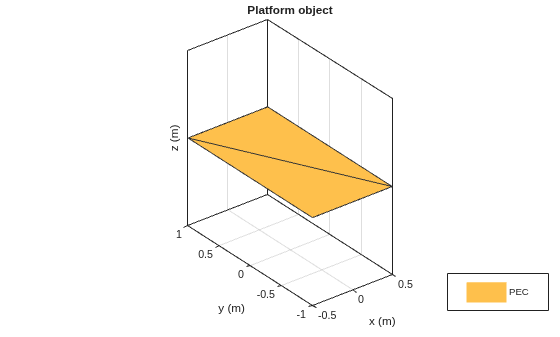
Figure contains an axes object. The axes object with title Platform object, xlabel x (m), ylabel y (m) contains 2 objects of type patch. This object represents PEC.

Create a pcbStack object. Write its geometry to separate STL files, one for the metal layer and one for the dielectric layer. Set the thickness of the metal layer to 1 mm, the maximum edge length of the mesh triangles to 10 mm, and the gradation in mesh triangle sizes to 0.7. Display the meshed metal and dielectric layer geometries.

p = pcbStack;
stlwrite(p,"pcbantenna.stl",Thickness=1e-3,MaxEdgeLength=10e-3,GrowthRate=0.7,SeparateFiles=true,View="all")
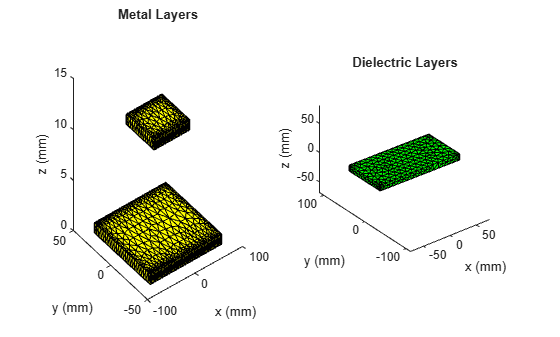
Figure contains 2 axes objects. Axes object 1 with title Metal Layers, xlabel x (mm), ylabel y (mm) contains an object of type patch. Axes object 2 with title Dielectric Layers, xlabel x (mm), ylabel y (mm) contains an object of type patch.

Input Arguments

collapse all

Antenna or array to write the mesh information, specified as one of the following options:

Example: patchMicrostrip

Example: circularArray

Example: customArrayGeometry

PCB antenna, specified as a pcbStack object.

Name of STL file, specified as a string with .stl extension.

Example: "antenna_100MHz.stl"

Data Types: string

Name-Value Arguments

collapse all

Specify optional pairs of arguments as Name1=Value1,...,NameN=ValueN, where Name is the argument name and Value is the corresponding value. Name-value arguments must appear after other arguments, but the order of the pairs does not matter.

Example: stlwrite(pcbObj,"antenna_100MHz.stl",Thickness=0.005) writes the mesh information to the STL file with metal layer thickness set to 5 mm

Metal and dielectric layer thickness, specified as a positive scalar in meters. When you specify this property, the function applies the specified thickness to all metal and dielectric layers in the pcbStack object and writes each layer as a closed solid, rather than as a surface with zero thickness.

Example: 0.001

Data Types: double

Gradation in the mesh triangle sizes, specified as a scalar in the range (0,1).

Example: GrowthRate=0.7 states that the growth rate of the mesh is 70 percent

Data Types: double

Maximum edge length of triangles in the mesh, specified as a scalar in meters. Smaller values produce finer meshes.

Example: 0.01

Data Types: double

Minimum edge length of triangles in the mesh, specified as a positive scalar in meters.

Example: 2e-3

Data Types: double

Option to write geometry to multiple STL files, specified as one of the following:

  • false — Write all geometry to one STL file.

  • true — Write an STL file for each metal and dielectric layer.

Example: true

Data Types: logical

Option to display exported geometry, specified as one of the following:

  • "all" — Display both metal and dielectric layers.

  • "metal" — Display only metal layers.

  • "dielectric" — Display only dielectric layers.

Example: "all"

Data Types: string

Version History

Introduced in R2019a

expand all

See Also

Objects

Functions