setInputSampleRate
R2026bDescription
setInputSampleRate(
sets the input sample rate of the input object to Obj,FsIn)FsIn.
When you change the input sample rate using the setInputSampleRate
function, other frequency properties of the object scale accordingly. You can view the input
sample rate information using the info function. For an example, see Specify Input Sample Rate in dsp.LowpassFilter Object.
Examples
Using SampleRate Argument
Specify the input sample rate explicitly while constructing the dsp.FIRFilter object using the SampleRate argument.
firFilt = dsp.FIRFilter(SampleRate=22050)
firFilt =
  dsp.FIRFilter with properties:

            Structure: 'Direct form'
      NumeratorSource: 'Property'
            Numerator: [0.5000 0.5000]
    InitialConditions: 0

  Show all properties
You can view this information using the Input sample rate field of the info function.
info(firFilt)
ans = 7×35 char array
    'Discrete-Time FIR Filter (real)    '
    '-------------------------------    '
    'Filter Structure  : Direct-Form FIR'
    'Filter Length     : 2              '
    'Stable            : Yes            '
    'Linear Phase      : Yes (Type 2)   '
    'Input sample rate : 22050          '
Visualize the frequency response of the filter using filterAnalyzer. Note the frequency range from 0 to 11025 Hz.
filterAnalyzer(firFilt,FilterNames="FIRFilter22050Hz")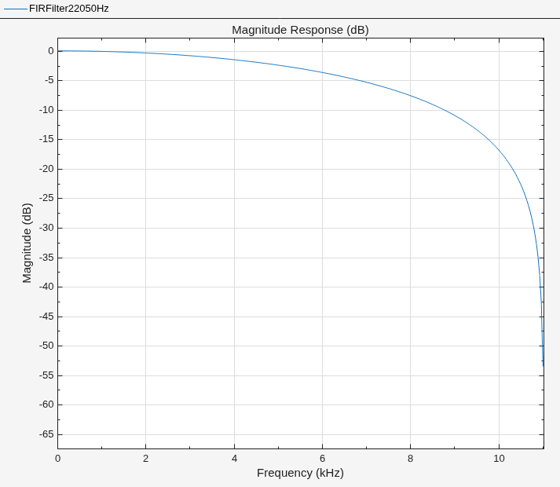
Using setInputSampleRate Function
To specify the input sample rate after constructing the object, use the setInputSampleRate function.
setInputSampleRate(firFilt,44100)
To confirm, view the sample rate information using the info function.
info(firFilt)
ans = 7×35 char array
    'Discrete-Time FIR Filter (real)    '
    '-------------------------------    '
    'Filter Structure  : Direct-Form FIR'
    'Filter Length     : 2              '
    'Stable            : Yes            '
    'Linear Phase      : Yes (Type 2)   '
    'Input sample rate : 44100          '
Visualize the frequency response of the filter using filterAnalyzer. Note the change in frequency interval from 0 to 22050 Hz.
filterAnalyzer(firFilt,FilterNames="FIRFilter44100Hz")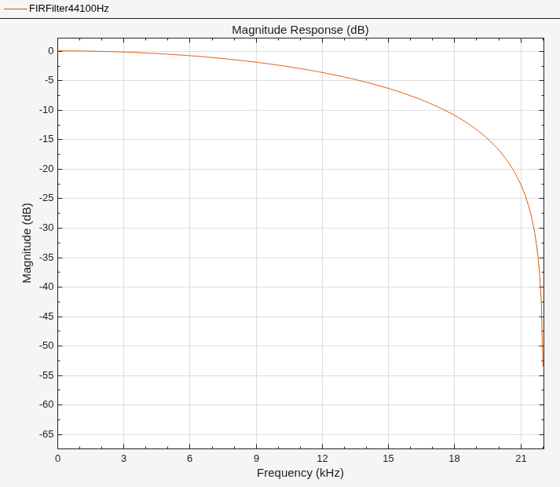
Specify the input sample rate explicitly while constructing the dsp.LowpassFilter object using the SampleRate argument.
lpFilter = dsp.LowpassFilter(SampleRate=24050)
lpFilter =
  dsp.LowpassFilter with properties:

               FilterType: 'FIR'
    DesignForMinimumOrder: true
        PassbandFrequency: 8000
        StopbandFrequency: 12000
           PassbandRipple: 0.1000
      StopbandAttenuation: 80
      NormalizedFrequency: false
               SampleRate: 24050

  Show all properties
You can view this information using the Input sample rate field of the info function.
info(lpFilter)
ans = 7×35 char array
    'Discrete-Time FIR Filter (real)    '
    '-------------------------------    '
    'Filter Structure  : Direct-Form FIR'
    'Filter Length     : 15             '
    'Stable            : Yes            '
    'Linear Phase      : Yes (Type 1)   '
    'Input sample rate : Normalized     '
To specify the input sample rate after constructing the object, use the setInputSampleRate function.
setInputSampleRate(lpFilter,44100)
When you change the input sample rate using this function, other frequency properties of the object scale accordingly.
lpFilter
lpFilter =
  dsp.LowpassFilter with properties:

               FilterType: 'FIR'
    DesignForMinimumOrder: true
        PassbandFrequency: 1.4669e+04
        StopbandFrequency: 2.2004e+04
           PassbandRipple: 0.1000
      StopbandAttenuation: 80
      NormalizedFrequency: false
               SampleRate: 44100

  Show all properties
Change the sample rate to "normalized" and the other frequency properties change accordingly.
setInputSampleRate(lpFilter,"normalized")
lpFilter
lpFilter =
dsp.LowpassFilter with properties:
FilterType: 'FIR'
DesignForMinimumOrder: true
PassbandFrequency: 0.6653
StopbandFrequency: 0.9979
PassbandRipple: 0.1000
StopbandAttenuation: 80
NormalizedFrequency: true
Show all properties

